MCHP QDEC Calibration (Non-Index)


Block Dialog
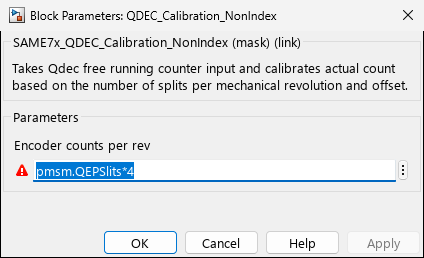
Screenshots taken with chip SAME70Q21B - UFBGA144
Overview
The QDEC Calibration (Non-Index) block provides software-based position calibration for quadrature encoder applications that do not have a physical index pulse. This subsystem implements an algorithm to establish an absolute reference position using external reset signals or application logic, enabling accurate position tracking without dedicated index hardware.
When to use:
- No index pulse — Encoder lacks index channel but needs absolute position reference
- Home switch calibration — Establish zero position using limit switch or home sensor
- Cost-sensitive designs — Use 2-channel encoder instead of 3-channel (no index hardware)
- Software-triggered calibration — Application logic determines calibration point
- SAM QDEC applications — Works with QDEC SAMx block output
When NOT to use:
- Encoder has index — Use hardware index pulse support in QEI/QDEC blocks directly
- No calibration needed — If relative position sufficient, use raw QDEC output
- Already absolute encoder — Absolute encoders (SSI, BiSS, EnDat) don’t need calibration
- High-precision homing — Hardware index more repeatable than software calibration
- Frequent power cycles — Must recalibrate after each power-on (index automatic)
Key Features:
- Software-based index pulse emulation
- Configurable counts-per-revolution
- Reset-based position calibration
- Compatible with QDEC SAMx blocks
- Absolute position calculation
- Wrap-around handling
Typical Applications
- Motor Control: Position tracking without index pulse
- Robotics: Joint angle calibration and tracking
- Industrial Automation: Conveyor position monitoring
- Cost-Sensitive Designs: Eliminate index channel hardware
- Legacy Encoder Interfaces: Work with 2-channel encoders
Parameters
Encoder Configuration
| Parameter | Description | Typical Values |
|---|---|---|
| EnCountPerRev | Encoder counts per mechanical revolution | 360, 1000, 1024, 2048, 4096 |
Note: This parameter must match the physical encoder specification. For quadrature encoders, this is typically 4× the encoder’s specified lines-per-revolution (due to 4× edge decoding).
Examples:
- 250 line encoder → 1000 counts per revolution
- 1024 line encoder → 4096 counts per revolution
Calibration Strategy
The calibration can be triggered by various application signals:
- Home Switch: Physical home position sensor
- Software Command: External calibration request
- Startup Initialization: Power-up position establishment
- Periodic Recalibration: Drift compensation
Subsystem Architecture
Input Ports
| Port | Description | Data Type |
|---|---|---|
| Qdec count | Raw position count from QDEC hardware | Integer |
| Qdec_reset | Calibration trigger signal | Boolean |
Output Ports
| Port | Description | Data Type |
|---|---|---|
| Calibrated Position | Absolute position with reference | Integer |
Internal Processing
The calibration subsystem performs the following operations:
- Count Capture: Receive raw encoder count from QDEC peripheral
- Reset Detection: Monitor calibration trigger signal
- Offset Calculation: Compute position offset when reset occurs
- Position Compensation: Apply offset to raw counts
- Wrap Handling: Manage position rollover at counts-per-revolution boundary
- Output Generation: Provide calibrated absolute position
Calibration Procedure
Manual Calibration Sequence
Step 1: Physical Setup
- Ensure encoder properly mounted
- Verify electrical connections
- Power up system

Step 2: Move to Reference Position
- Manually jog or command motor
- Position mechanism at calibration point
- Ensure stable position

Step 3: Trigger Calibration
- Assert Qdec_reset input (rising edge)
- System captures current count as offset
- Position resets to zero (or defined value)

Step 4: Verify Operation
- Move through full mechanical range
- Verify position tracking accuracy
- Check wrap-around at ±EnCountPerRev/2
Automatic Calibration
For home switch-based systems:
1. At startup, drive toward home switch
2. Detect home switch activation
3. Back off to consistent position
4. Trigger calibration
5. Move to operational starting position
6. Begin normal operation
Notes
Absolute Position Reference
Unlike indexed encoders, this calibration provides:
- Relative Accuracy: Position accurate relative to last calibration
- No Absolute Reference: Does not know absolute position at power-up
- Recalibration Needed: After power cycle, must recalibrate
Calibration Accuracy
Position accuracy depends on:
- Mechanical repeatability of calibration position
- Stability during calibration trigger
- EnCountPerRev parameter accuracy
- QDEC peripheral clock accuracy
Best Practices:
- Calibrate at same mechanical position each time
- Ensure system is stationary during calibration
- Verify EnCountPerRev matches actual encoder
- Recalibrate periodically if drift suspected
Motion During Calibration
Warning: If motion occurs during the calibration pulse:
- Position reference may be inaccurate
- Recommend stopping motion before calibration
- Or use edge-triggered calibration logic
Count Wrap-Around
QDEC hardware has finite counter width:
- SAMx devices: Typically 16-bit counters (±32768 counts)
- High-resolution encoders may overflow quickly
- Calibration subsystem handles wrap mathematically
- Monitor for excessive accumulated offset
Device Support
SAME5x Series
- QDEC peripheral with position counter
- Software calibration support
- Compatible with QDEC SAMx block
SAMC2x Series
- QDEC peripheral with position counter
- Software calibration support
- Compatible with QDEC SAMx block
Note: This block is a Simulink SubSystem that works in conjunction with the QDEC SAMx hardware block. The hardware block provides the raw encoder counts, and this subsystem adds calibration logic.
Examples
Basic Integration
1. Add QDEC SAMx block to model
2. Add QDEC_Calibration_NonIndex subsystem
3. Connect QDEC output to "Qdec count" input
4. Create calibration trigger logic
5. Connect trigger to "Qdec_reset" input
6. Set EnCountPerRev parameter
7. Use "Calibrated Position" output for control
With Home Switch
Hardware Setup:
- Encoder A/B channels → QDEC inputs
- Home switch → Digital Input
- No index channel required

Model Configuration:
1. QDEC SAMx: Configure A/B inputs
2. Digital Input: Read home switch
3. Edge Detection: Detect home switch rising edge
4. QDEC_Calibration: Feed edge to Qdec_reset
5. Position Controller: Use calibrated position
Software-Based Calibration
Application Logic:
1. Move motor to known physical position
2. Stop motor movement
3. Trigger calibration via software signal
4. System establishes zero reference
5. All subsequent positions relative to calibration point
Troubleshooting
Position Drifts Over Time
Check:
- Encoder properly mounted (no slippage)
- Electrical connections stable
- No EMI affecting encoder signals
- EnCountPerRev parameter correct
Solution:
- Implement periodic recalibration
- Verify mechanical coupling
- Add electrical shielding
Calibration Inconsistent
Check:
- Calibration position mechanically repeatable
- System fully stopped during calibration
- Trigger signal clean (not bouncing)
- Sufficient settling time before calibration
Solution:
- Use debounced trigger signal
- Add delay before calibration
- Verify mechanical consistency
Position Jumps Unexpectedly
Check:
- EnCountPerRev parameter matches encoder
- QDEC not losing counts (motion too fast)
- No counter overflow in QDEC hardware
- Wrap-around logic correct
Solution:
- Reduce motion speed during high-resolution tracking
- Verify sample rate sufficient for encoder speed
- Check QDEC hardware configuration
Cannot Find Zero Position
Check:
- Home switch properly connected
- Trigger logic functioning
- Calibration signal reaching Qdec_reset input
- Edge detection configured correctly
Solution:
- Verify trigger signal in Signal Builder
- Add LED indicator for calibration event
- Log calibration occurrences for debugging
Implementation Details
Position Offset Calculation
When Qdec_reset is asserted:
Offset = Current_Raw_Count
Calibrated_Position = 0 (at reset moment)
For subsequent samples:
Calibrated_Position = Current_Raw_Count - Offset
Wrap-Around Handling
The subsystem includes logic to handle encoder count wrap-around:
If (Calibrated_Position > EnCountPerRev/2):
    Calibrated_Position -= EnCountPerRev

If (Calibrated_Position < -EnCountPerRev/2):
    Calibrated_Position += EnCountPerRev
This ensures position stays within ±EnCountPerRev/2 range.
References
- SAME5x Family Datasheet - QDEC Module
- SAMC2x Family Datasheet - QDEC Module
- Application Note AN2154: Quadrature Encoder Interface
- Motor Control Application Note: Position Tracking Without Index
Related Blocks
- QDEC SAMx: Hardware encoder interface (required)
- QEI: Quadrature Encoder Interface for dsPIC devices
- PDEC: Position Decoder for SAME5x devices
- Digital Input: For home switch/limit switch reading
- Change Notification: Alternative calibration trigger source