PWM HS FEP


Block Inputs/Outputs
Variable Block Inputs
All block inputs can be individually enabled or disabled in the block configuration dialog. When disabled, the corresponding value set at initialization time remains constant.
Available block inputs:
- Period — PWM period (time duration of one complete PWM cycle)
- DutyCycle 1..N — Pulse width for each enabled channel. This input specifies the on-time (pulse width) as a time value, not a ratio.
- PhaseShift 1..N — Time delay applied to the pulse within the PWM period (shifts the pulse position relative to the period start)
- SEVTCMP — Special Event Compare trigger timing (sets when the ADC trigger fires within the PWM period)
- TRIGx 1..N — Additional trigger compare values for multi-point ADC triggering
- DeadTimeH/L 1..N — Dead-time values for high-side and low-side transitions
Variable Block Outputs
Trigger 1..N(boolean) - Trigger output signalsStatus(uint16) - PWM status information (if enabled)
Scaling
The block supports 4 input datatype representations:
| Input Type | Range | Scaling | Description |
|---|---|---|---|
| Uint raw | 0 to PWMxmax | User handles scaling | Direct register value |
| Float [0 1] | 0.0 to 1.0 | Block scales internally | Normalized unipolar |
| Float [-1 1] | -1.0 to 1.0 | Block scales internally | Normalized bipolar |
| Float (s) | Time in seconds | Block scales internally | Physical time value |
⚠️ Important: The block performs no range checking on inputs. Users must clamp values before the block input (e.g., using a Saturation block) to prevent overflow, regardless of datatype.
Float Inputs (3 options)
Selecting a float datatype accepts either single or double precision floating-point values. dsPIC33A devices have hardware FPU—float inputs are processed efficiently. dsPIC33C uses software emulation—consider uint raw inputs for time-critical loops.
- Float [0 1] (Unipolar): Normalized control where 0.0 represents 0% duty cycle and 1.0 represents 100% duty cycle. The block handles all scaling internally.
- Float [-1 1] (Bipolar): Normalized control where -1.0 and +1.0 represent the duty cycle extremes. Suitable for H-bridge and bidirectional control where the sign indicates direction.
- Float (s) (Physical): Specify duty cycle or period directly in seconds. The block converts to register values automatically.
Uint Raw Input (1 option)
- Uint raw: Integer values transfer directly to peripheral registers with no runtime computation—maximum efficiency.
The block creates workspace variables for user scaling:
| Variable | Description |
|---|---|
PWM1max…PWM8max | Maximum timer count per channel (based on Max Period in GUI) |
Fixed Period (period input disabled):
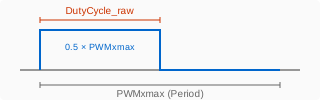
$$\text{DutyCycle}_\text{raw} = \text{DutyCycle}_\text{normalized} \times \text{PWMxmax}$$
DutyCycle_raw = DutyCycle_normalized × PWMxmax
Where DutyCycle_normalized is in the range [0, 1] relative to the fixed Max Period.
Variable Period (period input enabled):
When the period is dynamically controlled via block input, both period and duty cycle use the same scaling:
$$\text{Period}_\text{raw} = \text{Period}_\text{normalized} \times \text{PWMxmax}$$
Period_raw = Period_normalized × PWMxmax
$$\text{DutyCycle}_\text{raw} = \text{DutyCycle}_\text{normalized} \times \text{Period}_\text{raw}$$
DutyCycle_raw = DutyCycle_normalized × Period_raw
⚠️ Constraints:
- Period input must always be < PWMxmax (Max Period in GUI)
- Duty cycle normalizes to the actual period input, not
PWMxmax - If ADC triggers from PWM events and drives the scheduler, changing period alters the control loop sample time
Center-Aligned vs Edge-Aligned
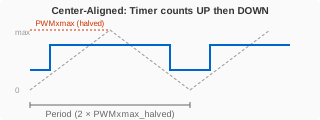
Center-Aligned Mode: The PWMxmax workspace variable is halved at configuration time because the timer counts both up and down. This applies to all input types (Uint raw, Float).
No runtime division: Since PWMxmax is already halved, the block passes integer inputs directly to registers without any runtime shift operation. Users simply scale their values to the halved PWMxmax.
Dead Time
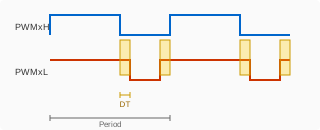
GUI configuration: Specify in seconds (e.g.,
1e-6for 1 µs)Integer block input: Dead time uses a different scaling base (full period, not halved).
⚠️ In center-aligned mode, multiply
PWMxmaxby 2 for dead time scaling:
$$\text{DeadTime}_\text{raw} = \frac{\text{DeadTime}_s \times 2 \times \text{PWMxmax}}{\text{MaxPeriod}_s}$$
DeadTime_raw = (DeadTime_s × 2 × PWMxmax) / MaxPeriod_s
- Note: Dead time scaling is identical in center-aligned and edge-aligned modes—the factor of 2 compensates for the halved
PWMxmax
Block Parameters
Mode & Clock Configuration
| Parameter | Description |
|---|---|
| PWM set with Period and | Alignment mode: Edge Aligned - Duty Cycle and Phase Shift, Edge Aligned - Rising and Falling Edge, Center Aligned, or Center Aligned - Double Update |
| Clock source | Clock routing: Use scaling circuit, Use divider circuit, or no scaling |
| Clock source resolution | Shows computed PWM resolution and maximum period. Dynamic display: [PWM res X.XX(ns) => period up to YY(µs)]. Must use “no scaling” for HiRES mode |
Initialization
| Parameter | Description |
|---|---|
| Max Period (s) | Maximum PWM period defining the PWMxmax workspace variable. Dynamic display shows: PWM1max=PWM2max=...=XXXX (Nbits) represent YY(µs) |
| Initial Period (s) | Starting period value when period is not a block input |
| Initial Duty-Cycle (s) | Starting duty cycle value. Label changes to Initial Phase-Shift or Initial Rising/Falling Edge based on mode |
| Initial Phase-Shift (s) | Starting phase shift value (when applicable based on mode) |
| Block output sample time | Sample time for block outputs (typically matches PWM period) |
PWM Channels
| Parameter | Description |
|---|---|
| High/Low side Mode | Output configuration: Complementary, Redundant, Push Pull, or Independent |
| PWM X Channel | Per-channel enable: PWMxH & PWMxL output enabled, PWMxH output enabled, PWMxL output enabled, or not used |
| Swap PWMx_H and PWMx_L | Exchange H and L output pin assignments |
| Invert PWMx_H/L output polarity | Active-low output. Dynamic display shows actual pin: (Bxx [pin] active low) |
Note: Up to 8 channels available depending on device. Polarity/swap options appear per enabled channel.
Triggers
| Parameter | Description |
|---|---|
| Show Trigs for PWM X | Enable trigger configuration for each PWM generator (on/off) |
When enabled, trigger parameters (SEVTCMP, TRIG1, TRIG2) appear for ADC synchronization.
Block Input
| Parameter | Description |
|---|---|
| Block input format | Independent Scalar (one input per channel) or Vectors (grouped by function) |
| Period | Not a block input, or select scaling: Uint raw, Float [0 1], Float [-1 1], Float (s) |
| Duty-Cycle | Input scaling for duty cycle. Same options as Period |
| Phase-Shift | Input scaling for phase shift (when mode supports it) |
| PWM Fault State is a block Output | Enable fault status output port |
Dead Time (Protection)
| Parameter | Description |
|---|---|
| Dead Time mode | Disabled, Positive dead time, or Positive dead time with compensation |
| Positive dead time on rising edge of PWM_H (s) | Dead time inserted before PWM_H turns ON |
| Positive dead time on rising edge of PWM_L (s) | Dead time inserted before PWM_L turns ON |
Dead time prevents shoot-through in half-bridge configurations. Visible only when dead time mode is enabled.
Additional Features
Key Features
| Feature | 33C WAC07 | 33A V3 (STX04) | 33A V4 (STX32/21) | Benefits |
|---|---|---|---|---|
| HiRES Mode | ✅ YES | ❌ NO | ✅ YES | 16× enhanced resolution |
| Max Channels | Variable | Variable | 12 max (STX32) | 8 max (STX21) |
| Register Width | 16-bit | 32-bit | 32-bit | Overflow protection |
| Dead Time | ✅ YES | ✅ YES | ✅ YES | Motor drive safety |
| ADC Triggers | ✅ YES | ✅ YES | ✅ YES | Synchronized sampling |
| Master/Slave | ✅ YES | ✅ YES | ✅ YES | Multi-channel coordination |
High-Resolution Mode Critical Requirements
⚠️ MANDATORY High-Resolution Mode Constraints
Reference: DS70005320 - dsPIC33/PIC24 Family Reference Manual - High-Resolution PWM with Fine Edge Placement , Section 4.1.3 - “High-Resolution PWM with Fine Edge Placement”
Primary Restriction (ALL Families):
“High-Resolution mode CANNOT be used with frequency scaling or the clock divider.”
Required Configuration for HiRES Mode (HREN=1):
CLKSEL[1:0] bits (PGxCONL[4:3]) MUST be set to
'01'This selects
pwm_master_clkDIRECTLY (no divider/scaling)pwm_master_clk frequency requirements:
dsPIC33C: MUST be 500 MHz for High-Resolution mode
dsPIC33A: Refer to device datasheet timing requirements
STX32: 800 MHz typical
STX21: 400 MHz typical
CLKSEL Bit Mapping and HiRES Compatibility
| CLKSEL[1:0] | Clock Path | HiRES Compatible? | User Option |
|---|---|---|---|
| 00 | Off (no clock) | ❌ NO | Not applicable |
| 01 | Direct (master clock) | ✅ YES | “no scaling” |
| 10 | Divider circuit | ❌ NO (FORBIDDEN) | “Use divider circuit” (no PLL) |
| 11 | Scaling circuit | ❌ NO (FORBIDDEN) | “Use scaling circuit” (no PLL) |
Additional High-Resolution Constraints
| Constraint | Applies To | Reference |
|---|---|---|
| Dual PWM mode cannot be used with Complementary Output in HiRES | All families (HREN=1) | DS70005320 - dsPIC33/PIC24 Family Reference Manual - High-Resolution PWM with Fine Edge Placement , Sect. 4.1.3 |
| Minimum duty cycle: | 0x0020 | (vs. |
| Minimum period: | 0x0080 | (vs. |
| Some register LSBs forced to 0 (PGxLEB, PGxPHASE, etc.) | All families (HREN=1) | DS70005320 - dsPIC33/PIC24 Family Reference Manual - High-Resolution PWM with Fine Edge Placement , Sect. 4.1.3.1 |
PWM-ADC Synchronization
Proper synchronization between PWM generation and ADC sampling is critical for motor control and power conversion applications. The PWM module can trigger ADC conversions at precise timing points, ensuring current measurements occur when switching noise is minimal.
Scheduler Trigger Options
The MCHP Blockset supports multiple strategies for triggering the control algorithm execution, each with specific advantages:
Option 1: Timer-Based Trigger (Baseline)
Configuration:
- Independent timer generates periodic interrupts
- ADC and PWM operate independently
- Control algorithm executes at fixed timer rate
Use Cases:
- Simple periodic control loops without strict timing requirements
- Applications where ADC/PWM timing flexibility is needed
- Testing and debugging (easy to change rates independently)
Limitations:
- No guaranteed synchronization between PWM switching and ADC sampling
- Risk of sampling during PWM transitions (switching noise corruption)
- Separate timer consumes additional hardware resources
Option 2: Timer → ADC → Task (Improved Synchronization)
Configuration:
- Timer triggers ADC conversion start
- ADC end-of-conversion triggers control task execution
- Control algorithm executes immediately when sensor data is ready
Advantages:
- Deterministic latency: Task starts exactly when ADC conversion completes
- Data freshness: Control algorithm uses most recent measurements
- Reduced jitter: Eliminates polling overhead
Use Cases:
- Applications requiring precise timing between measurement and computation
- Multi-rate control systems with independent ADC timing
- Systems where PWM frequency differs from control loop frequency
Option 3: PWM → ADC → Task (Motor Control Standard)
Configuration:
- PWM Special Event Trigger (SEVTCMP) starts ADC conversion
- ADC end-of-conversion triggers control task execution
- Control algorithm calculates new PWM duty cycle for next period
Key Benefits for Motor Control:
- Optimal sampling timing: Sample when PWM low-side FET is ON (minimizes switching noise)
- Synchronized to PWM period: Control rate automatically matches PWM frequency
- Phase current sensing: Sample during current flow through shunt resistor
- Hardware coordination: No software overhead for synchronization
Typical SEVTCMP Timing (Center-Aligned PWM):
% For center-aligned PWM, sample at valley (maximum current flow)
SEVTCMP = 0;  % Trigger at PWM valley

% Alternative: Sample at peak
SEVTCMP = Period;  % Trigger at PWM peak

% For edge-aligned PWM, sample mid-period
SEVTCMP = Period/2;  % Trigger at 50% duty cycle point
Use Cases:
- Field-Oriented Control (FOC): Phase current measurement for Clarke/Park transforms
- BLDC motor control: Commutation with synchronized sensing
- DC-DC converters: Inductor current sensing during ON-time
- Inverter control: Output current monitoring synchronized to switching
Option 4: PWM → Multiple ADC Triggers → Task (Advanced)
Configuration:
- Multiple trigger points within single PWM period
- SEVTCMP + TRIG1/TRIG2 enable sequential ADC conversions
- Different sampling phases for comprehensive measurement
- Control task executes after all conversions complete
Advanced Use Cases:
3-Phase motor control: Sample each phase current at different PWM timing
SEVTCMP: Phase A current (PWM valley)
TRIG1: Phase B current (25% into period)
TRIG2: Phase C current (75% into period)
Dual current sensing: Capture both rising and falling edge currents for average calculation
Multi-level inverters: Sample at different switching states
Ripple analysis: Capture peak and valley for DC-link ripple measurement
Configuration Example (3-Phase FOC):
% PWM Configuration:
PWMx_ECAM_ITB = 'Center aligned - Symmetric';
Period = 1/20e3;  % 20 kHz PWM

% Trigger Configuration:
SEVTCMP = 0;              % Trigger ADC1 at PWM valley (Phase A)
TRIG1 = Period/4;         % Trigger ADC2 at 25% (Phase B)
TRIG2 = 3*Period/4;       % Trigger ADC3 at 75% (Phase C)

% ADC Configuration:
% - ADC1 (Channel 0): Phase A current, triggered by SEVTCMP
% - ADC2 (Channel 1): Phase B current, triggered by TRIG1
% - ADC3 (Channel 2): Phase C current, triggered by TRIG2
% - All three conversions complete before control task executes
Synchronization Best Practices
        Always use PWM → ADC → Task for motor control applications
        Set SEVTCMP timing carefully:

                Center-aligned: Sample at valley (SEVTCMP = 0) for maximum current amplitude
                Edge-aligned: Sample mid-period (SEVTCMP = Period/2) to avoid edges


        Account for ADC conversion time: Ensure conversion completes before next PWM event
        Match base sample time: Simulink base time step = PWM period (ensures proper code generation)
        Verify trigger timing: Use Task State block to measure execution timing on oscilloscope
Common Synchronization Issues and Solutions
| Issue | Symptom | Solution |
|---|---|---|
| Noisy current measurements | High-frequency spikes in ADC readings | • Move SEVTCMP away from PWM edge transitions |
| Task overrun | MCU Load > 100%, control instability | • Reduce PWM frequency (increase period) |
| Incorrect trigger timing | ADC samples at wrong point in PWM cycle | • Verify SEVTCMP value calculation |
| Phase current mismatch | Sum of phase currents ≠ 0 (Kirchhoff violation) | • Synchronize all phase current ADC triggers to same PWM point |
Implementation in Simulink Model
Step-by-Step Configuration:
- Configure PWM Block:
% In PWM_HS_FEP block dialog:
PWMx_ECAM_ITB = 'Center aligned - Symmetric';
Period = 1/20e3;  % 20 kHz
SEVTCMP_Config = 'Constant';
SEVTCMP_Value = 0;  % Sample at valley
- Configure ADC Block:
% In ADC block dialog:
Trigger_Source = 'PWM Special Event';
PWM_Trigger_Select = 'PWM1 SEVTCMP';  % Match PWM generator
Sample_Time = 'Inherited';  % Triggers set ADC rate
- Set Simulink Solver:
% Configuration Parameters → Solver:
Solver = 'Fixed-step';
Fixed_step_size = 1/20e3;  % Match PWM period
Tasking_mode = 'Multitasking';  % For rate monotonic scheduler
- Verify Timing:
- Add Task State block to monitor control loop execution
- Add MCU Load block to verify CPU utilization < 80%
- Build and test on hardware with oscilloscope
Troubleshooting
HiRES Mode Not Working
Checklist:
- ✅
PWMx_ClockResolutionset to"no scaling"(MANDATORY) - ✅ pwm_master_clk configured correctly (500 MHz for 33C, per datasheet for 33A)
- ✅ Period and duty cycle values meet minimum requirements (0x0080 period, 0x0020 duty)
- ✅ Not using dual PWM + complementary output mode (incompatible with HiRES)
Invalid Clock Configuration Error
Error: “HiRES mode cannot be used with divider or scaling circuit”
Solution: Change PWMx_ClockResolution to "no scaling". The divider and scaling circuits are incompatible with High-Resolution mode per DS70005320 - dsPIC33/PIC24 Family Reference Manual - High-Resolution PWM with Fine Edge Placement
Section 4.1.3.
Backward Compatibility Warning
Duty Cycle Saturation
Cause: HiRES mode has higher minimum duty cycle than standard mode.
Solution: Ensure duty cycle commands ≥ 0x0020. For very low duty cycles, use standard resolution mode.
Supported Device Families
| Family | Representative Chips | TLC Variant | HiRES Support | PWM Synthesis Freq |
|---|---|---|---|---|
| dsPIC33C | (Andromeda) | 33CK64MC105 | 33CK512MP608 | 33CK1024MP710 |
| dsPIC33A | (Perseus) | 33AK128MC106 | V3_STX04 | (Perseus) |
| dsPIC33A | (Pegasus) | (Serpens) | (BlueRidge) | 33AK512MPS512 |
Related Blocks
- MCHP_PWM_HighSpeed - High-speed PWM for dsPIC33C/CH/CK (older variant)
- MCHP_PWM - Standard PWM for dsPIC30F/33F/33E
- MCHP_MCPWM - Motor Control PWM (advanced features)
- MCHP_ADC - ADC with PWM trigger synchronization
- MCHP_Master - Master block for clock configuration