SECONDARY CORE


Overview
The SECONDARY CORE block is used in master core projects to link the secondary (slave) core firmware image. This block enables dual-core applications on dsPIC33CH family devices by specifying the path to the secondary core .s image file generated by a separate Simulink model configured for the secondary core.
Key Features:
- Links secondary core
.simage file into master project - Supports absolute and relative path configurations
- Stores both path formats for portability
- Automatically sets the model’s
SlaveModelReferenceparameter
When to use:
- Building dual-core applications on dsPIC33CH devices where master and secondary cores run separate Simulink models
- The secondary core device name ends with “S1” suffix (e.g., dsPIC33CH512MP508S1 for secondary, dsPIC33CH512MP508 for master)
Note: Output pins must be driven by one core exclusively. Input pins can be used by both cores simultaneously.
Block Dialog
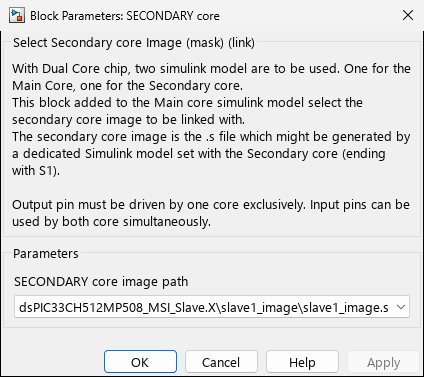
Screenshots taken with chip 33AK512MPS512
Ports
This is a configuration-only block with no signal ports.
Parameters
| Parameter | Variable | Description | Values |
|---|---|---|---|
| SECONDARY core image path | SLAVE_sFile | Path to the secondary core .s image file | None | Path to .s file | Select slave image |
Path Storage
The block maintains two internal path representations:
- SLAVE_sFile_Save (hidden) - Absolute path used at build time
- SLAVE_sFile_Save_relative (hidden) - Relative path for portability
When a secondary image is selected, the block:
- Stores the absolute path
- Computes the relative path from the master model’s directory
- Updates the block display to show the selected image folder name
- Sets the model parameter
SlaveModelReferencewith the full file path
Path Configuration
Absolute Path:
- Full path to the
.sfile (e.g.,C:\Projects\MyApp\Secondary.X\slave1_image\slave1_image.s) - Used directly for builds
- Not portable across machines
Relative Path:
- Path relative to the master model directory (e.g.,
\Secondary.X\slave1_image\slave1_image.s) - Preferred for version control and project portability
- Block automatically resolves to absolute path when model folder exists
Workflow
- Create secondary core model - Configure MCHP Master block with secondary device (ending in S1)
- Build secondary model - Generates
.simage file in<model>.X/slave1_image/slave1_image.s - Add SECONDARY CORE block to master model - Select “Select slave image” and browse to the generated
.sfile - Build master model - Automatically links the secondary core image into the master firmware
Related Blocks
- Master - Master core and device configuration