PortInfo


When to use:
- Debugging pin conflicts (multiple blocks using same pin)
- Verifying GPIO allocation before hardware design finalized
- Visualizing PPS (Peripheral Pin Select) mappings for remappable devices
- Identifying available GPIO pins for new features
- Documenting pin usage for team collaboration or production
✗ This block is never harmful:
- Informational utility only — no code generation impact
- Add to model during development for pin conflict detection
- Remove if not needed — purely a diagnostic aid
Display Information
| Information | Description |
|---|---|
| Port Assignments | All GPIO pins used by model with their function |
| PPS Mappings | Remappable peripheral assignments |
| Conflicts | Duplicate pin assignments (highlighted in red) |
| Available Pins | Unused GPIO pins |
Example Output
The report below was produced by the Port Info block inside the MCLV-48V-300W (dsPIC33AK256MPS306, BlueRidge DIM) motor-control template. It lists every pin claimed by the model’s blocks — ADC channels, the three Op-Amps, the QEI encoder, PWM1/2/3 H&L, UART1, and the digital I/O — and flags a pin that two features both requested:
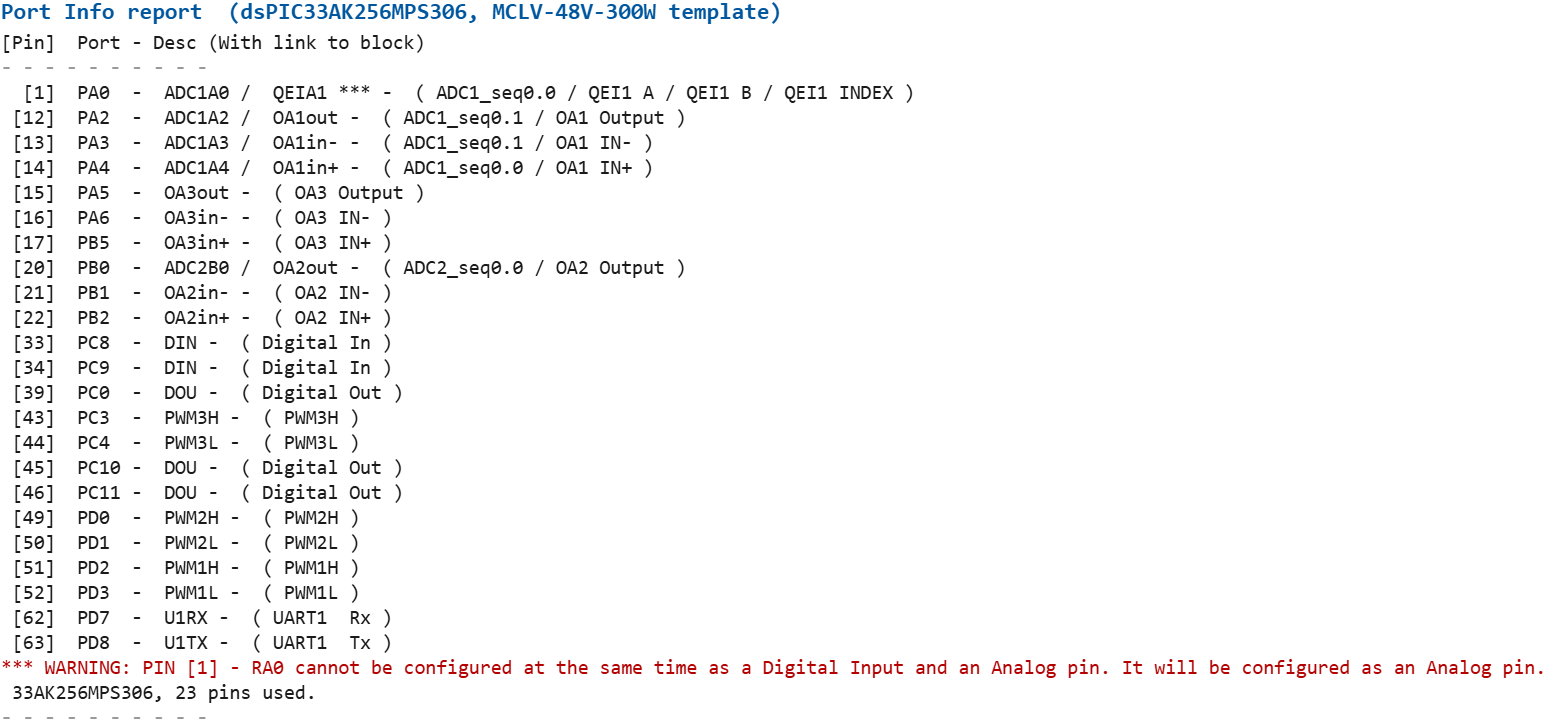
Screenshots taken with chip 33AK256MPS306
Each line is [Pin] Port - Signal(s) - ( owning block(s) ). In the live
Command Window each block name is a clickable link that highlights the block
in the model. The red *** WARNING line shows a detected pin conflict and how
the blockset resolves it.
Usage
- Add PortInfo block to model
- Double-click to open display
- Review port assignments
- Resolve any conflicts shown Conflict Resolution: Conflicts must be fixed before code generation. Change pin assignments in the conflicting peripheral blocks.
Related Blocks
- TimerInfo — Timer resource allocation
- Digital Input — GPIO configuration