TimerInfo


When to use:
- Debugging timer conflicts (multiple peripherals requesting same timer)
- Verifying timer allocation before adding new features (check available timers)
- Understanding which peripheral uses which timer resource
- Identifying timer configuration (prescaler, period, mode)
- Documenting timer usage for project handoff or review
✗ This block is never harmful:
- Informational utility only — no simulation or code generation impact
- Add to model for timer resource visualization
- Remove if not needed — purely a development aid
Display Information
| Information | Description |
|---|---|
| Timer Allocation | Which peripheral uses which timer |
| Timer Configuration | Prescaler, period, mode |
| Conflicts | Multiple peripherals requesting same timer |
| Available Timers | Unused timer resources |
Example Output
The report below was produced by the Timer Info block inside the MCLV-48V-300W (dsPIC33AK256MPS306, BlueRidge DIM) motor-control template. It shows each timer the blockset allocated, its resolution and maximum period, and which peripheral it serves — plus how many timers remain free:
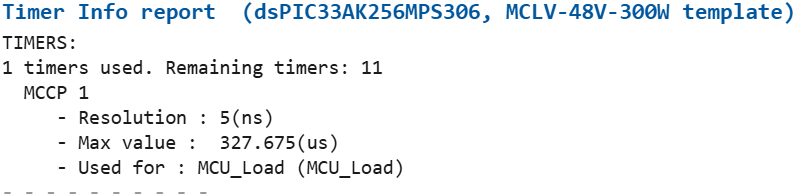
Screenshots taken with chip 33AK256MPS306
When a peripheral cannot be given a compatible timer, the report prints a red
No solution found line with a clickable link to the offending block and the
list of timers that would work.
Usage
- Add TimerInfo block to model
- Double-click to view allocation
- Verify no conflicts exist
- Identify available timers for new features Timer Conflicts: Must be resolved before code generation. Reconfigure peripheral blocks to use different timers.
Related Blocks
- PortInfo — GPIO allocation
- Timer Blocks - Timer peripheral blocks