MPLAB Blockset Installation

Software Requirements
Supported Operating Systems: Windows and Linux
| Component | Requirements |
|---|---|
| 1. MATLAB/Simulink MathWorks | Required: • MATLAB R2018b to R2025b • Simulink • Embedded Coder (includes Simulink Coder) Optional: • Fixed-Point Designer • MATLAB Coder • Stateflow / Stateflow Coder • Motor Control Blockset • System Identification Toolbox • DSP System Toolbox • Signal Processing Toolbox • Control System Toolbox • Optimization Toolbox |
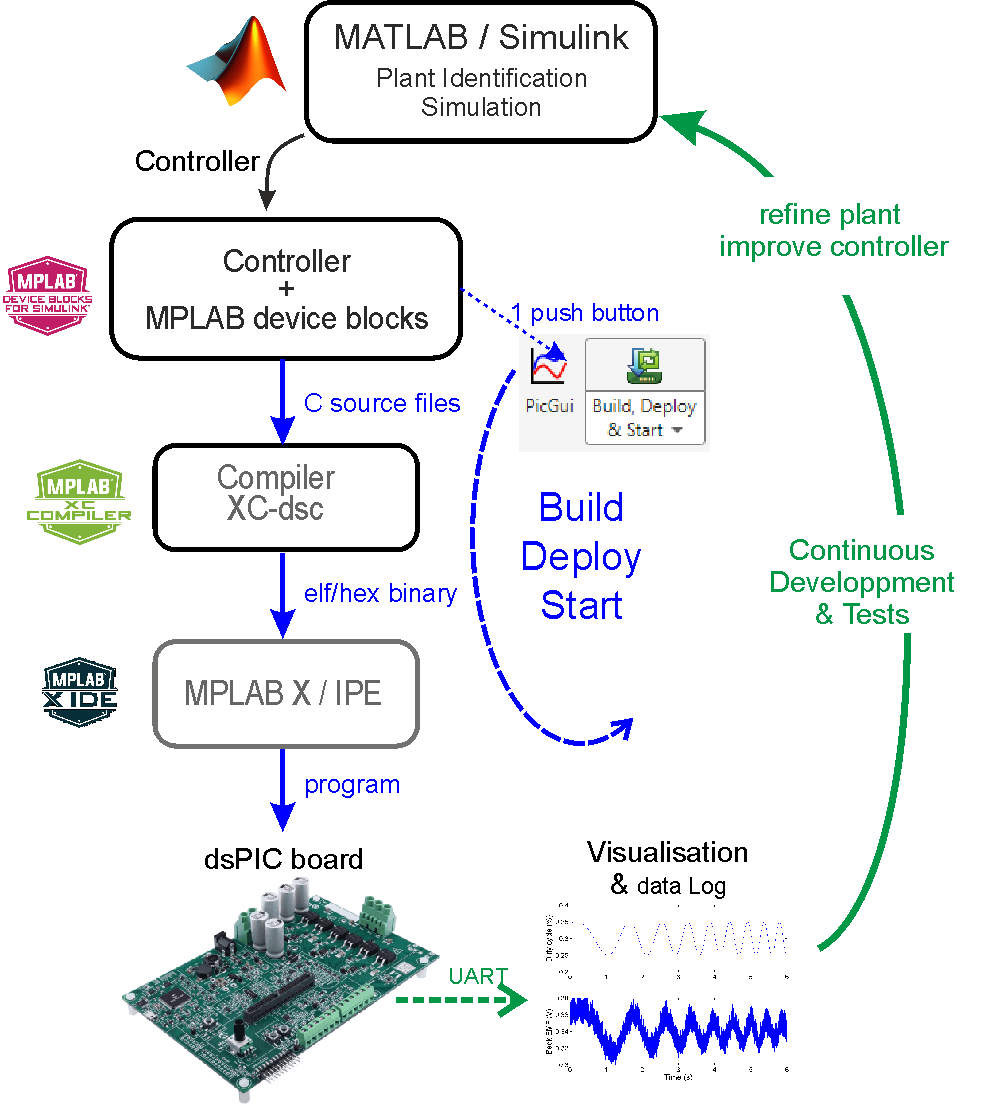
| 2. MPLAB Device Blocks MATLAB File Exchange | GitHub Releases | • Peripheral blocks (PWM, ADC, UART, Timers, etc.) • Board Templates • Standalone, External-Mode, PIL |
| 3. Microchip Compiler XC Compilers (Free - no time/size limits) | • XC-DSC for dsPIC30F/33F/33E/33C/33A • XC32 for PIC32/PIC32A/SAM (ARM) |
| 4. MPLAB X IDE MPLAB X | • Programming/debugging tool • Supports ICD4, ICD5, PICkit4, PICkit5, PKOB4, Snap |
-O2; -O3 and -Os require paid license.Hardware Requirements
Target Board
The blockset supports any board equipped with a compatible dsPIC DSC, PIC32 or SAM microcontroller.
Ready-to-use Simulink templates with preconfigured peripherals are provided for the following development boards:
| Development Board | PIM or DIM - DSC MODULES | Development Board | PIM or DIM - DSC MODULES |
|---|---|---|---|
 | • Integrated dsPIC33AK512MPS506 DSC • Power supply and digital power management applications • On-board debugger with USB-UART bridge (no external programmer required) |  | • Integrated dsPIC33CK64MC105 DSC • Motor control and digital signal processing applications • On-board debugger with USB-UART bridge (no external programmer required) |
 | • Integrated dsPIC33CK256MC005 DSC • Compact motor-control / general-purpose prototyping • On-board PKOB nano (programmer + USB-CDC serial) |  | • Integrated dsPIC33CK256MP508 DSC • RGB LED demo, buttons, potentiometer • On-board PKOB nano (programmer + USB-CDC serial) |
 | • dsPIC33AK128MC106 General Purpose DIM EV02G02A (External Mode ready) |  | • Integrated dsPIC33CK256MP508 DSC |
 | • dsPIC33CK256MP508 PIM MA330041-2
(Internal) / MA330041-1
(External) • dsPIC33CK64MC105 PIM MA330051-2 (Internal) / MA330051-1 (External) • dsPIC33EP256MC506 PIM MA330031 (External OpAmp) |  | • EV14E50A
- dsPIC33CDV64MC106 • EV04R09A - dsPIC33CDVL64MC106 |
 | • dsPIC33AK128MC106 DIM EV68M17A
(Internal/External OpAmp) • dsPIC33AK256MPS306 DIM EV22K90A (Internal/External OpAmp) • dsPIC33AK512MC510 DIM (Pegasus, Internal/External OpAmp) • dsPIC33CK256MP508 DIM EV62P66A (Internal/External OpAmp) • dsPIC33CK64MC105 DIM EV03J37A (Internal/External OpAmp) |  | • dsPIC33AK128MC106 DIM EV68M17A
(Perseus, Internal/External OpAmp) • Active PFC front-end (boost), 325 V DC bus, 1.5 kW continuous • Isolated gate drivers, phase + DC-bus + VAC sensing |
 | • Reference design - Potentiometer on Throttle, buttons and encoder on AUX board |
Programmer/Debugger
Required for boards without integrated programmers. Supported programmers: ICD4, ICD5, PICkit4, PICkit5, PKOB4, Snap
J32 programmer (Segger) supports SAM microcontrollers only.
UART to USB Bridge Cable (Recommended)
Recommended for boards that lack USB-to-UART bridge or when higher bandwidth (>460 kbaud) is required.
High-bandwidth communication (External Mode, up to 12 Mbaud) requires an FTDI FT232H USB-to-UART cable (All FTDI Cables):
- C232HD-DDHSP-0 (3.3V)
- C232HD-EDHSP-0 (5V)

Installation
Blockset Installation
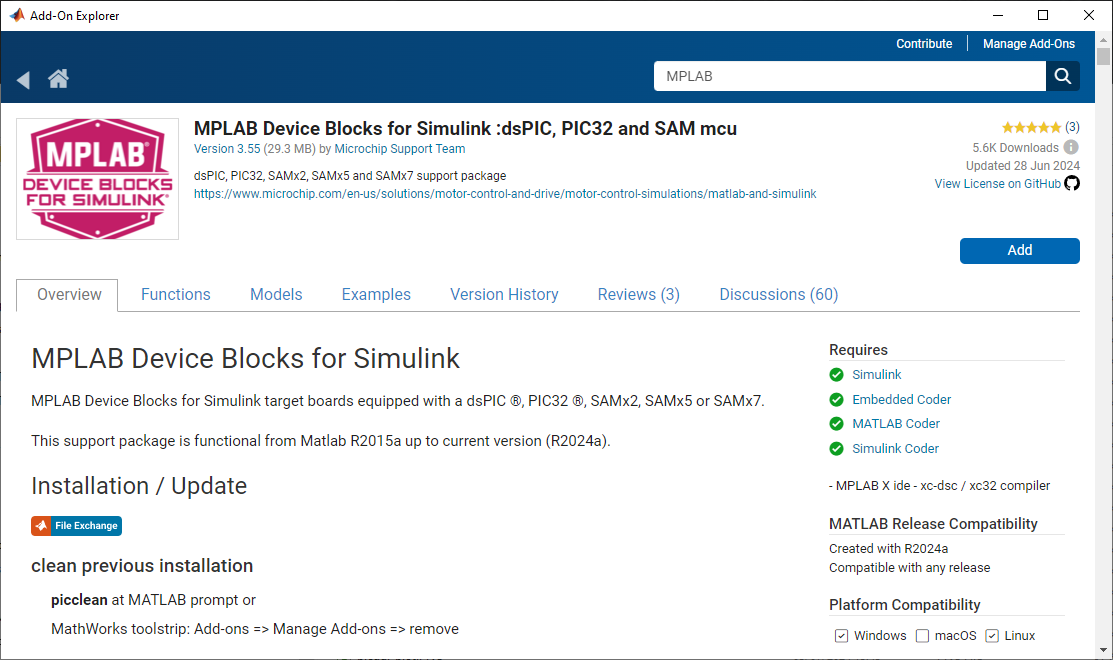
In MATLAB Add-On Explorer, search for “MPLAB” and click Add.
Offline installation or older MATLAB releases:
- Download the .mltbx installer package from GitHub Releases page and run it from MATLAB
Custom installation location:
- Download the .mltbx package and install.p script from GitHub Releases page and place them in the same folder
- Run install.p - at prompt “Install as an add-on using MathWorks predefined folder? Y/N Y”, select N and enter your custom path
Check Blockset Installation
After the Add-On installer finishes, MATLAB sets the blockset path automatically — you do not need to run picsetup. Type picInfo('check') in the MATLAB Command Window to validate the environment (compilers, MPLAB X, licences, attached programmers).
Sample output with a healthy install and three programmers attached:
>> picInfo('check')

------------------------------------------------------------
   Microchip Blockset 3.xx Installed:
------------------------------------------------------------

 Refreshing caches...

 [1/6] Toolbox location
   [OK]  Blockset in C:\Users\...\MATLAB Add-Ons\Toolboxes\MPLAB Device Blocks for Simulink

 [2/6] MATLAB environment
   [OK]  MATLAB R2025b
   [OK]  Simulink licence available
   [OK]  Embedded Coder licence available

 [3/6] Microchip compilers
   [OK]  2 compiler(s) for dsPIC (16-bit / dsPIC33A):
         - C:/Program Files/Microchip/xc16/v2.10     (XC16    v2.10)
         - C:/Program Files/Microchip/xc-dsc/v4.00   (XC-DSC  v4.00)
   [OK]  1 compiler(s) for 32-bit chips:
         - C:/Program Files/Microchip/xc32/v4.60     (XC32    v4.60)

 [4/6] MPLAB X IDE (programmer interface)
   [OK]  Interface to program chip found.
         MDB : C:\Program Files\Microchip\MPLABX\v6.26\mplab_platform\bin\mdb.bat
         IPE : C:\Program Files\Microchip\MPLABX\v6.26\mplab_platform\mplab_ipe\ipecmd.jar
         Java: C:\PROGRA~1\MICROC~1\MPLABX\v6.26\sys\java\ZULU88~1.422\bin\java.exe

 [5/6] MPLAB X version advisory
   [OK]  MPLAB X v6.26 (no known-bad advisory)

 [6/6] Attached programmers (live probe, ~10 s)
   MDB probe : 3 programmer(s) detected.
         - MPLAB ICD 5(020054102RYN003838)
         - MPLAB PICkit 5(020026702RYN013775)
         - MPLAB Snap ICD(021038102RYN001730)

------------------------------------------------------------
 Summary: 9 OK. Environment looks healthy.
------------------------------------------------------------

 Latest:     3.63.20   (you are up to date)
Each [X] or [!] line carries a clickable hint — for example a missing XC-DSC compiler prints a direct link to its download page.
picInfo also reports the latest release published on the
GitHub Releases
page next to your installed version. When a newer version is available it
prints an update available notice with a link; when you are current it prints
(you are up to date). The check is best-effort (one query per session,
result cached) and never blocks — if the machine is offline or behind a proxy
it is silently skipped.
Troubleshooting
Commands for the MATLAB prompt
Blockset Configuration:
picInfo('check')- Full environment sanity check (compilers, MPLAB X, licences, programmers)picsetup- Advanced: manually re-apply the path (only needed when switching between a local dev tree and the installed Add-On, or repairing a broken path). Not required after a standard.mltbxinstall.picclean- Remove the blockset from the MATLAB path (run before installing a different version side-by-side)rehash toolboxcache- Refresh MATLAB toolbox cache
Simulink & Code Generation:
bdclose all- Close all Simulink models and clear memoryRTW.TargetRegistry.getInstance('reset')- Refresh compiler detectionsl_refresh_customizations- Refresh Simulink customizations
Documentation:
builddocsearchdb(fullfile(fileparts(which('MCHP_dsPIC_stf.tlc')), '../', 'doc'))- Refresh toolbox documentation index
For additional help, visit the Microchip MATLAB Forum or Discussion panel on MathWorks File Exchange
Next Steps
Quick Start Guide | Supported Devices | Board Templates | External Mode | PIL Testing