Scheduler & Multitasking

The MPLAB Device Blocks for Simulink includes a sophisticated scheduler that enables efficient execution of multi-rate Simulink models on resource-constrained microcontrollers. This guide explains the scheduler concepts, configuration options, and best practices for optimal performance.
Single-Rate vs Multi-Rate Models
Simulink models can be designed with blocks executing at the same rate (single-rate) or at different rates (multi-rate):
| Model Type | Description | Example | Use Case |
|---|---|---|---|
| Single-Rate | All blocks execute at the same sample time | All blocks at 1ms | Simple control loops, data acquisition |
| Multi-Rate | Blocks execute at different sample times | 1ms, 10ms, 100ms tasks | Motor control (fast current loop, slow speed loop, UI) |
Single-Tasking vs Multi-Tasking Implementation
For multi-rate models, the MPLAB Device Blocks toolbox offers two execution modes:
Single-Tasking Mode
In single-tasking mode, all tasks execute sequentially in a single loop. Fast tasks and slow tasks are called in order without preemption.
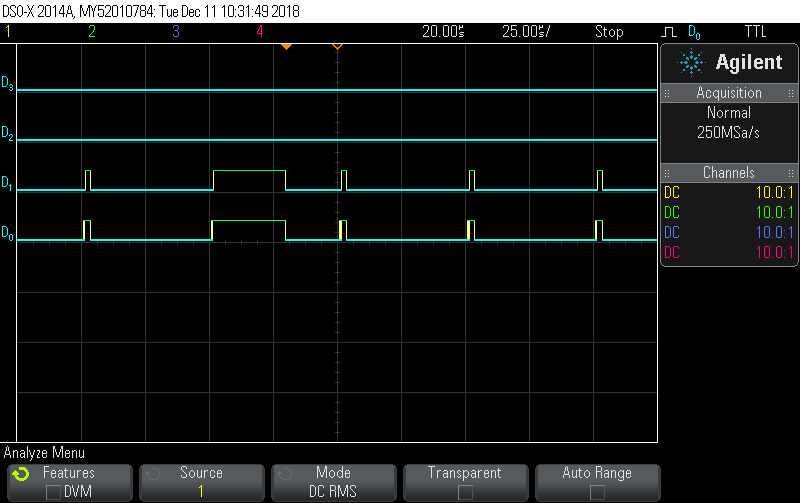
Figure 1: Single-tasking execution on a 70 MIPS dsPIC33. Tasks execute sequentially: fast 1ms task, then slow 10ms task when scheduled. No preemption occurs.
Advantages:
- Simple and predictable execution
- No priority management needed
- Easy to debug (linear execution flow)
- No context switching overhead
Disadvantages:
- CPU overload if total execution time exceeds base rate period
- Slow tasks delay fast tasks
- Not suitable for slow microcontrollers with tight timing requirements
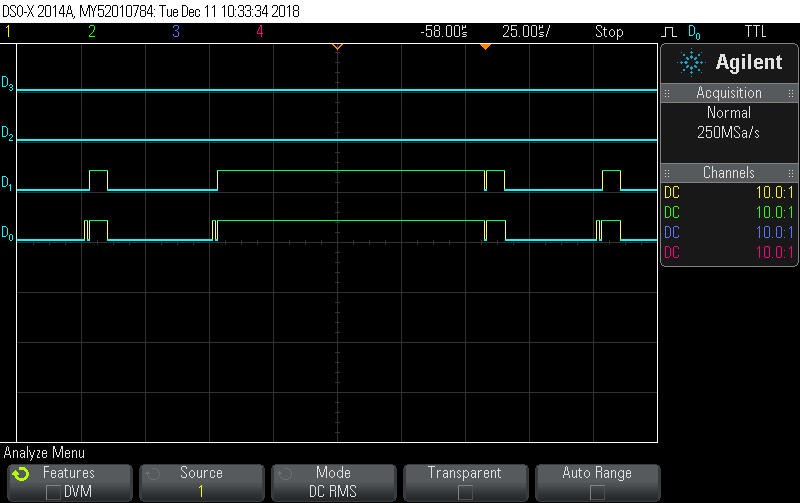
⚠️ Overload Scenario - Single-Tasking On slower chips or with computationally intensive algorithms, single-tasking can cause missed deadlines and timing violations:
Figure 2: Single-tasking overload on a 20 MIPS dsPIC33. The slow task (10ms) execution time extends beyond the 1ms base rate period, causing the fast task to miss its deadline. This results in timing violations and incorrect control behavior.
Consequences of overload:
- Fast control loops execute at incorrect rate
- System instability (motor oscillations, overshoot)
- Unpredictable behavior
Multi-Tasking Mode (Rate-Monotonic Scheduler)
In multi-tasking mode, tasks execute with priorities based on their execution rate. The scheduler implements the Rate-Monotonic Scheduling algorithm, where higher-rate tasks have higher priority.
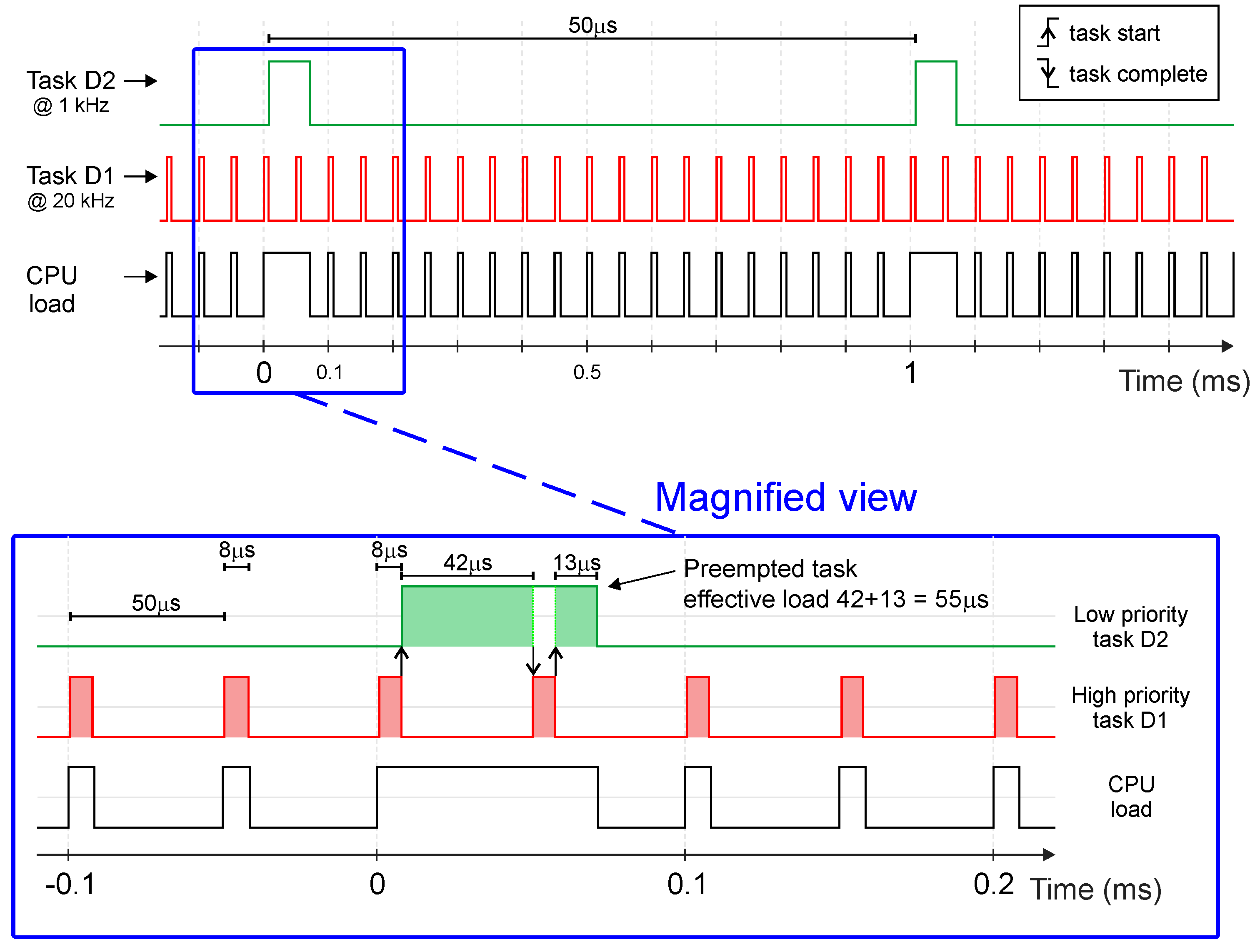
Figure 3: Rate-Monotonic Scheduler operation. Key principle: Higher rate tasks (faster execution frequency) have higher priority and can preempt slower tasks.
How it works:
- Each task is assigned a priority based on its rate (1ms > 10ms > 100ms)
- When a high-priority task needs to execute, it preempts any running low-priority task
- The preempted task resumes after the high-priority task completes
- This ensures fast critical tasks always meet their deadlines
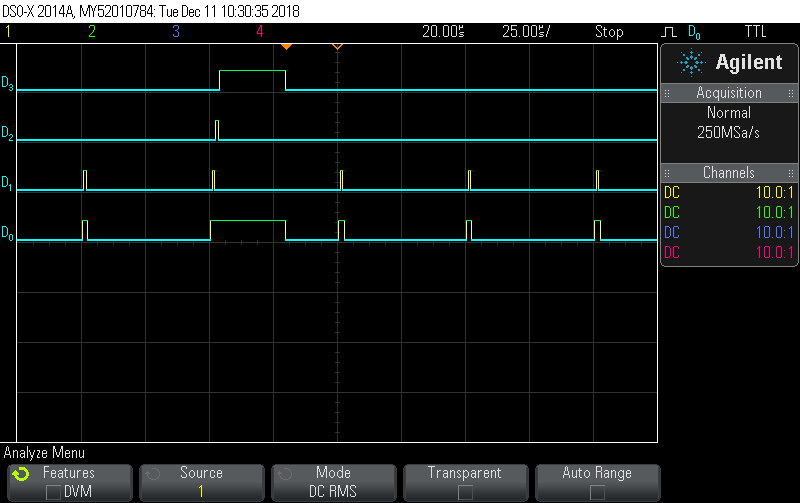
Figure 4: Multi-tasking execution on a 70 MIPS dsPIC33. The fast 1ms task (high priority) preempts the slow 10ms task (low priority) to meet its deadline. After completion, the 10ms task resumes execution.
Advantages:
- Better CPU utilization
- Fast tasks always meet deadlines even when slow tasks run long
- Prevents overload scenarios
- Optimal fixed-priority scheduling (proven by Liu & Layland, 1973)
Disadvantages:
- Slightly more complex than single-tasking
- Small overhead from context switching (typically <1%)
- Requires understanding of task priorities
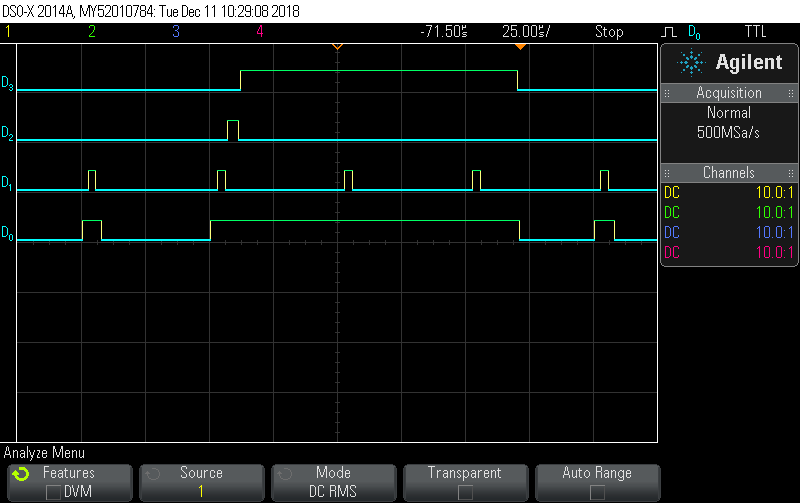
💡 Overload Prevention with Multi-Tasking Multi-tasking mode prevents the overload scenario seen in single-tasking mode:
Figure 5: Multi-tasking on a 20 MIPS dsPIC33. Even on this slower chip, the fast 1ms task executes on time by preempting the slow 10ms task. The system remains stable and all deadlines are met.
Result: Fast control loops maintain correct execution rate, ensuring system stability.
Rate-Monotonic Scheduling Theory
The Rate-Monotonic Scheduling (RMS) algorithm is a mathematically proven optimal fixed-priority scheduling algorithm for periodic tasks.
Priority Assignment Rule
Tasks are assigned priorities inversely proportional to their period:
| Task | Period (Sample Time) | Rate (Frequency) | Priority |
|---|---|---|---|
| Fast Control Loop | 1 ms | 1000 Hz | Highest (1) |
| Speed Loop | 10 ms | 100 Hz | Medium (2) |
| UI Update | 100 ms | 10 Hz | Low (3) |
| Background Task | 1000 ms | 1 Hz | Lowest (4) |
Schedulability Analysis
The RMS algorithm guarantees that all tasks will meet their deadlines if the following condition is met:
U = Σ(Ci / Ti) ≤ n(2^(1/n) - 1)

Where:
  U  = Total CPU utilization
  Ci = Execution time of task i
  Ti = Period of task i
  n  = Number of tasks

For 3 tasks: U ≤ 0.78 (78% CPU utilization)
For ∞ tasks: U ≤ 0.69 (69% CPU utilization - conservative limit)
When to Use Single-Tasking vs Multi-Tasking
| Scenario | Single-Tasking | Multi-Tasking | Recommendation |
|---|---|---|---|
| Simple single-rate control loop | ✅ Yes | Optional | Single-tasking for simplicity |
| Motor control (fast current + slow speed) | ⚠️ Maybe | ✅ Yes | Multi-tasking recommended |
| Slow chip (20-40 MIPS) | ❌ No | ✅ Required | Multi-tasking required |
| Fast chip (70+ MIPS) with margin | ✅ OK | ✅ Better | Either works, multi-tasking safer |
| Tight timing requirements | ❌ Risky | ✅ Yes | Multi-tasking for determinism |
| CPU utilization > 50% | ⚠️ Caution | ✅ Yes | Multi-tasking to prevent overload |
Configuration in MCHP Master Block
The scheduler mode is configured in the MCHP Master block:
Step 1: Open Master Block Configuration
1. Double-click the MCHP_Master block in your model
2. Navigate to the "Scheduler Options" tab
3. Locate the "Solver mode" parameter
Step 2: Select Scheduler Mode
``****````
| Option | Description | When to Use |
|---|---|---|
| MultiTasking | Rate-monotonic scheduler with preemption | Default and recommended |
| SingleTasking | Sequential execution without preemption | Single-rate models or when preemption is not desired |
| Auto | Automatically selects based on model rates | Let toolbox choose optimal mode |
Step 3: Verify Configuration
After building your model, check the generated code to verify the scheduler configuration:
/* In [ModelName].c */

/* Multi-tasking mode: Task functions with priorities */
void Task_1ms(void)   /* Priority 1 (highest) */
void Task_10ms(void)  /* Priority 2 */
void Task_100ms(void) /* Priority 3 */

/* Scheduler interrupt service routine */
void __attribute__((__interrupt__, no_auto_psv)) _T1Interrupt(void)
{
    /* Check which tasks need to execute */
    if (counter_1ms >= 1) {
        counter_1ms = 0;
        Task_1ms();  /* Execute highest priority task */
    }

    if (counter_10ms >= 10) {
        counter_10ms = 0;
        Task_10ms();  /* May be preempted by Task_1ms */
    }
}
Monitoring CPU Load and Task Execution
The MPLAB Device Blocks toolbox provides several blocks to monitor scheduler performance:
MCU Load Block
The MCU Load block measures actual CPU utilization:
- Outputs percentage of CPU time spent executing tasks
- Updates in real-time during execution
- Helps identify overload conditions before they occur
Usage:
1. Add MCHP_MCU_Load block to your model
2. Connect output to scope or data logging
3. Monitor during testing to ensure load < 80%
Tasks State Block
The Tasks State block provides detailed task execution information:
- Toggles output pin when each task executes
- Allows oscilloscope measurement of actual task timing
- Useful for verifying preemption behavior
See the timing diagrams in Figures 3-5 above - these were captured using the Tasks State block with an oscilloscope.
MCU Overload Block
The MCU Overload block detects timing violations:
- Triggers when a task exceeds its allocated time
- Can halt execution or trigger error handling
- Essential safety feature for production systems
Best Practices
1. Design for Determinism
- Use multi-tasking mode for multi-rate models
- Keep fast tasks short and predictable
- Move complex calculations to slower tasks when possible
2. Monitor CPU Load
- Target <70% CPU utilization for production systems
- Use MCU Load block during development to track usage
- Test worst-case scenarios (all tasks coinciding)
3. Task Execution Time Guidelines
| Task Priority | Maximum Execution Time | Guideline |
|---|---|---|
| Highest (fastest rate) | <50% of period | 1ms task should execute in <500μs |
| Medium | <70% of period | 10ms task should execute in <7ms |
| Lowest (background) | <90% of period | 100ms task can use up to 90ms |
4. Handle Priority Inversion
Avoid shared resources between tasks of different priorities. If necessary, use:
- Atomic operations for simple variables
- Disable interrupts briefly for critical sections
- Design tasks to be independent when possible
5. Testing Strategy
- Simulation: Verify algorithm correctness
- Single-rate test: Test all blocks at base rate first
- Multi-rate test: Enable different task rates
- Stress test: Add artificial load to verify overload handling
- Long-duration test: Run for hours to catch edge cases
Troubleshooting
Problem: Model execution is unstable
Possible causes:
- CPU overload (utilization > 100%)
- Task execution time exceeds period
- Timing violations in single-tasking mode
Solutions:
- Switch to multi-tasking mode
- Use MCU Load block to measure utilization
- Optimize slow code sections (use PIL for profiling)
- Move non-critical code to slower tasks
- Consider faster microcontroller
Problem: Fast task misses deadlines
In single-tasking mode:
- Slow task is blocking fast task execution
- Total execution time exceeds base rate period
Solution: Switch to multi-tasking mode to enable preemption
In multi-tasking mode:
- Fast task execution time is too long
- Higher-priority interrupts are blocking task
Solution: Optimize fast task or increase base rate period
Problem: Context switching overhead is high
If multi-tasking overhead is significant (rare, typically <1%):
- Reduce number of task rates
- Combine tasks with similar periods
- Consider if multi-tasking is actually needed
Related Documentation
- MCHP_Scheduler_Options Block Reference
- MCHP_Master Block Reference
- MCHP_MCU_Load Block Reference
- MCHP_MCU_Overload Block Reference
- MCHP_Tasks_State Block Reference
- External Mode & PIL Testing Guide
References
- Liu, C. L., & Layland, J. W. (1973). “Scheduling Algorithms for Multiprogramming in a Hard-Real-Time Environment”. Journal of the ACM, 20(1), 46-61.
- Buttazzo, G. C. (2011). Hard Real-Time Computing Systems: Predictable Scheduling Algorithms and Applications (3rd ed.). Springer.